AI advisory
Unsure where AI will help, what it will cost, or what happens to your data? Work directly with me to choose a useful first project.
- Find the work worth improving
- Clarify privacy, cost & ownership
- Agree on a pilot with useful outcomes
 DinhNVIndependent AI consultant
Hi, I'm Dinh.
Your team needs answers, not more files to search. Your sensitive data needs clear boundaries. I help businesses turn these problems into practical AI projects, from direct advice to delivery with a team.
Direct advice from me. Development delivered with a team.
Who approves a new vendor?
The procurement owner starts the review. Legal reviews the terms, then the operations lead gives final approval.
Vendor approval flow
Start with a real problem. Give the technology a clear job.
Unsure where AI will help, what it will cost, or what happens to your data? Work directly with me to choose a useful first project.
Important answers are buried in a growing archive, but your documents are too sensitive for an unrestricted AI tool. Let's plan a private knowledge system around your business.
Repetitive work and disconnected tools slow your team down. I lead a delivery team to build AI into the workflow you already use.
The answer may already be in your documents. Finding it means searching folders, opening PDFs, or asking the one person who knows. Let's make that knowledge easier to use, with privacy and access rules defined from the start.
Office AI Box or your own cloud account
Files, scans, tables & diagrams
Read, organize & find the answer
Knowledge stays hereWith sources they can check
Contracts, customer records, and internal decisions need a clear home. Define where data can be processed and who can see it before choosing an AI tool.
Policies, reports, scans, and diagrams pile up across folders. Help your team ask a business question and find the relevant source, without opening file after file.
The same questions keep reaching the same people. Make shared knowledge easier to use, so your specialists can focus on decisions that need their judgment.
Start with your data boundaries: which documents must stay in the office? Which can run in your own cloud account? Who should have access? We use those answers to scope where processing happens, including offline operation when required.
A large archive needs a plan beyond a chat interface. We assess what your team needs to find, which records they can access, and how the collection changes. Start with a representative slice, then scope storage, processing, and rollout around the results and your budget.
Technical capabilities to scope around your requirements
Parse text, scanned pages, and mixed layouts while keeping connections to the original document.
Extract text from scans and use local vision models to interpret images, charts, and diagrams.
Combine keyword and semantic search, rerank results, and link answers to source pages. Flag missing evidence.
Batch ingestion, background processing, progress tracking, retries, and index updates as documents change.
Knowledge-base permissions enforced during retrieval, with access and administrative audit logs.
Plan parsing, OCR, vision, embeddings, retrieval, answers, storage, and logs within your office or cloud environment.
A number buried under grouped headers. A component identified across two drawings. An answer spread across a faded scan. Explore the source material your team needs to make sense of.
Public document excerpts and fictional samples, with prewritten answers and manually marked reading guides. This preview does not run an AI model.
An analyst needs the right number from a dense report, without mixing up tasks, units, or footnotes.
At a 36-inch work surface, what are the right-slap capture times, and what does the number in parentheses mean?
In Table 2, follow the 36-inch row into the YTsr group (right slap). The mean is 7.2 seconds, the median is 7 seconds, and the standard deviation is 2.1 seconds. The parenthesized 1 is the interquartile range, as explained below the table.
Connect the grouped YTsr header, its three subcolumns, the 36-inch row, the task legend, and the footnote. A single cell without that context is easy to misread.
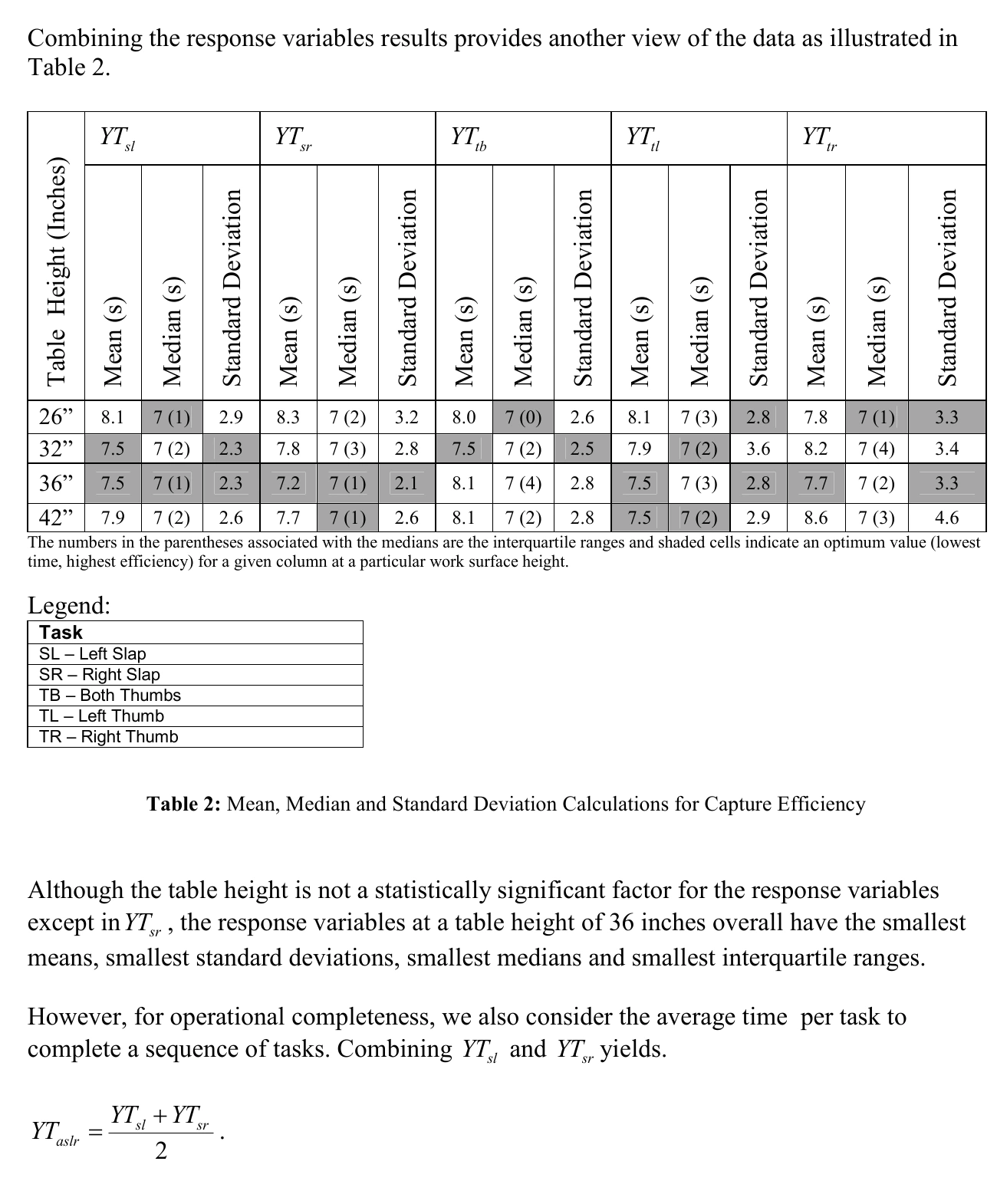
Theofanos et al. (2006), Effects of Scanner Height on Fingerprint Capture, NISTIR 7382. Republished courtesy of the National Institute of Standards and Technology.
Know what we're testing, and what success looks like.
Start with your team, workflow, data, and the outcome that would make a difference.
Agree on representative documents, access rules, infrastructure, and questions to test.
Can your team find a useful answer, check its source, and respect access boundaries? Test those questions before expanding.
Agree on a rollout, operating costs, ownership, and support that your business can sustain.

Dinh Van · Independent AI consultant
DinhNV is my personal home on the web. I work independently as an AI consultant, so you work directly with me on strategy, discovery, and technical direction.
When a project moves into AI development, I bring together a team for the agreed scope and stay involved in planning and review. Team roles, deliverables, and support are defined for each engagement.
For Local Knowledge AI, I help you scope a private document system and the infrastructure it needs. An office AI machine or your own cloud account can be part of the plan, even if you're starting without existing infrastructure.
Let's start with your problem.
Hard-to-find answers, sensitive documents, or a growing archive? Tell me where work gets stuck, how much data you have, and what must stay private. We can work out the technology and deployment together.